



Hooking an agent up to Unity Catalog functions, a SQL warehouse and a few managed MCP servers takes an afternoon. Keeping it useful through a task that runs for hours is a different job. Something has to remember what the agent already did, notice that a job run failed, and keep the thread when the context window fills up.
That work happens in the system around the agent. The agent itself is a loop: a model that uses tools, memory and feedback from its environment until the task is done. Who builds the system around that loop is the difference between an agent framework and an agent harness.
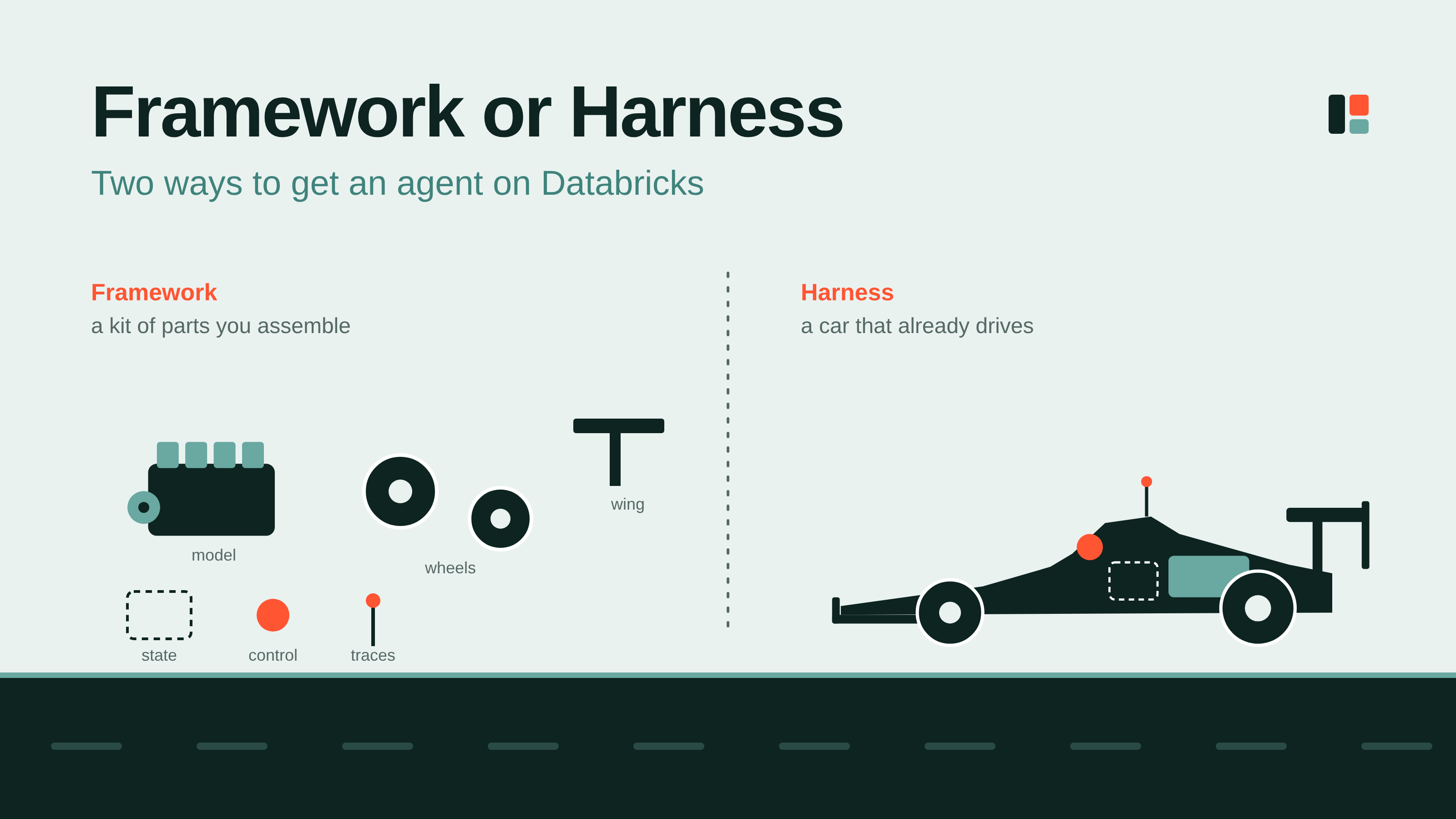
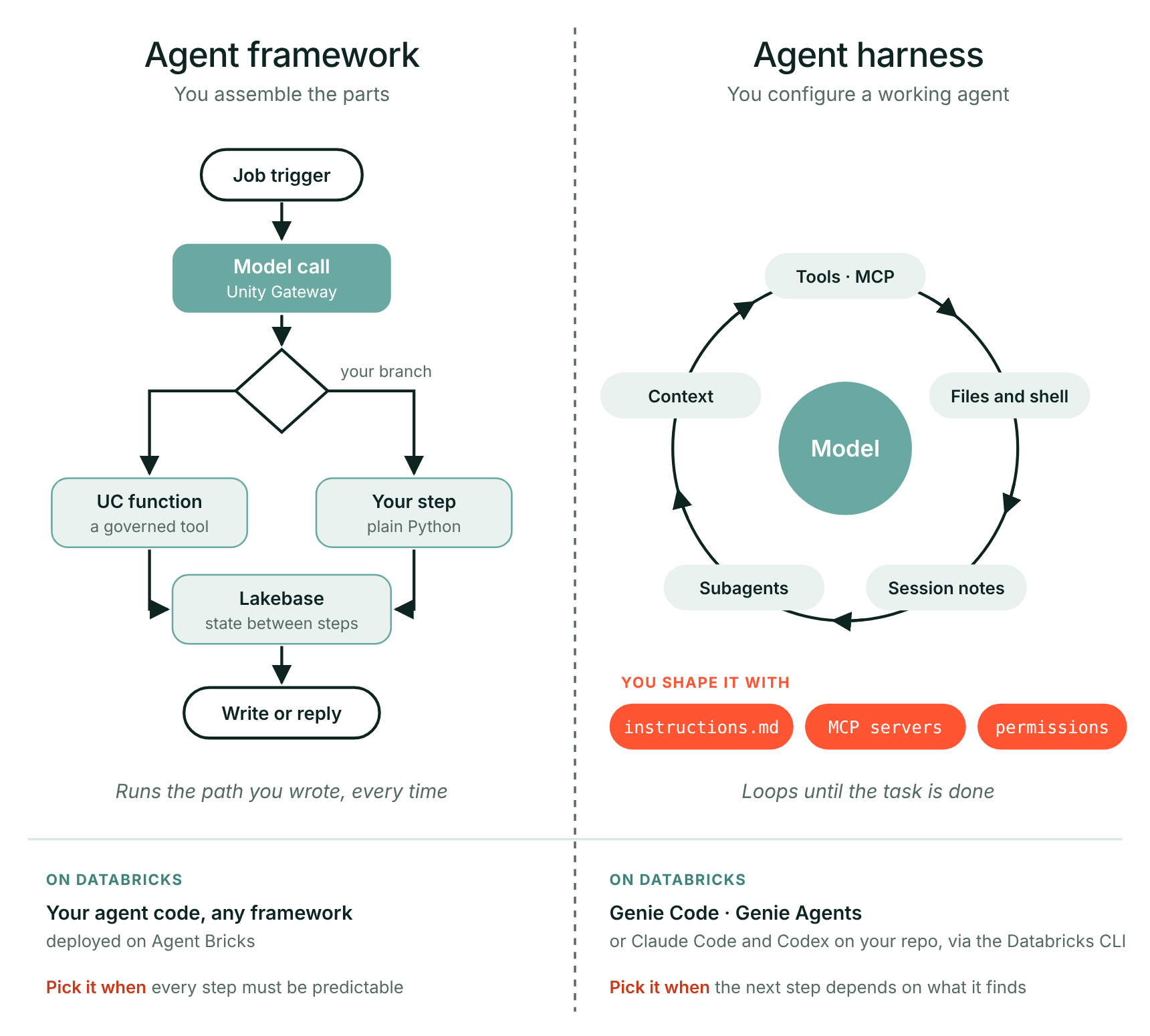
With a framework you get the parts, such as models, tools and state, and you decide per step which way the flow goes. With a harness you get the loop with everything around it already in place, ready to configure. Genie Code and Claude Code are examples. You can build your own harness on top of a framework, but then you maintain it too.
So the decision is how much of that system you want to build and keep running yourself. This piece follows one agent through both: built with a framework, then changed with a harness.
Two ways to get an agent
The framework route. On Databricks the parts are all there, bundled by Agent Bricks: models through Unity Gateway, tools as Unity Catalog functions and MCP servers, memory in Lakebase, every step traced in MLflow. What ties them together is code you write yourself, in a framework such as LangGraph or OpenAI Agents SDK, deployed on Agent Bricks. You get full control over the design, and all the work that comes with it.
The harness route. A harness ships the loop together with an environment to run it in: reading files, running commands, trimming context when it fills up, keeping notes on its progress between sessions, handing work to subagents. Databricks ships its own: Genie Agents for low-code agents on your data, and Genie Code for working in code, built into notebooks, the SQL editor and Lakeflow. Claude Code and Codex are the other common choice for code, working on your bundle repo and reaching the workspace through the Databricks CLI and the managed MCP servers. You don't build the loop. You configure it: a markdown file in the repo with your targets and conventions, the MCP servers it may call, and the permission rules that say what it may run.
Frameworks give you the steering wheel
An agent framework gives you the building blocks for an agent: models, tools, state and the orchestration between them. With those blocks you decide, step by step, how your agent behaves. That control is the main reason to choose one.
An example. Take a replenishment agent for a retail supply chain, built with an agent framework on Agent Bricks. Every night, for every store, it has four jobs:
- Look at recent sales, the season and upcoming promotions, and propose an order per product.
- Check that order against the rules: the store's budget, the supplier's minimum order quantity, the agreed delivery days.
- Send anything that still falls outside those rules to a buyer.
- Place the order with the supplier.
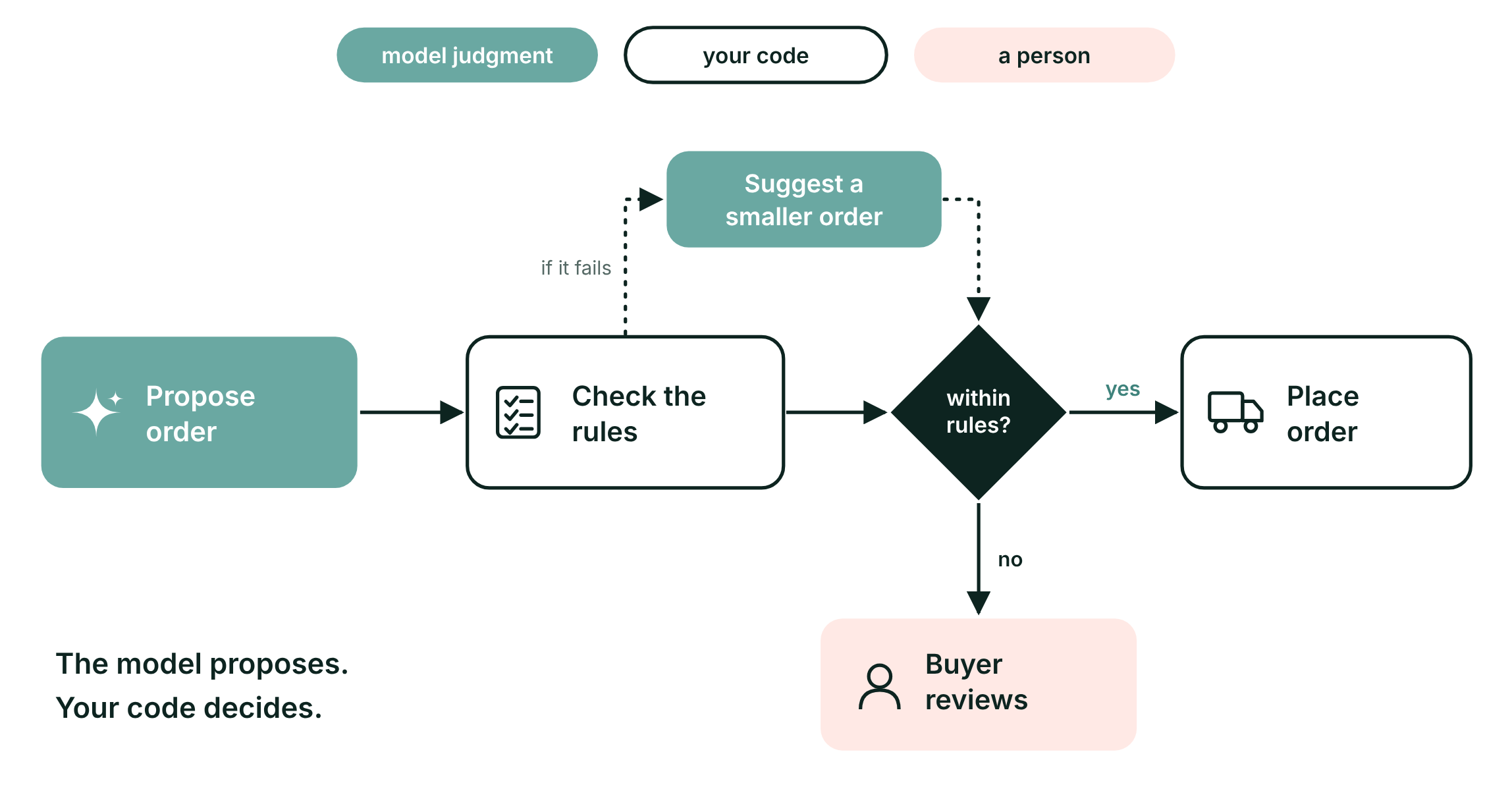
Step 1 needs judgment: demand moves with the weather, holidays and promotions, so the model does it. Steps 2 to 4 should never depend on the model's judgment, because a wrong order costs money straight away. With a framework you build that boundary into the agent itself. The model proposes an order. A step in your own code checks it against budget and supplier terms, using the tables already in your lakehouse. Only when the check passes does the agent get the tool that places the order. When it fails, a buyer decides.
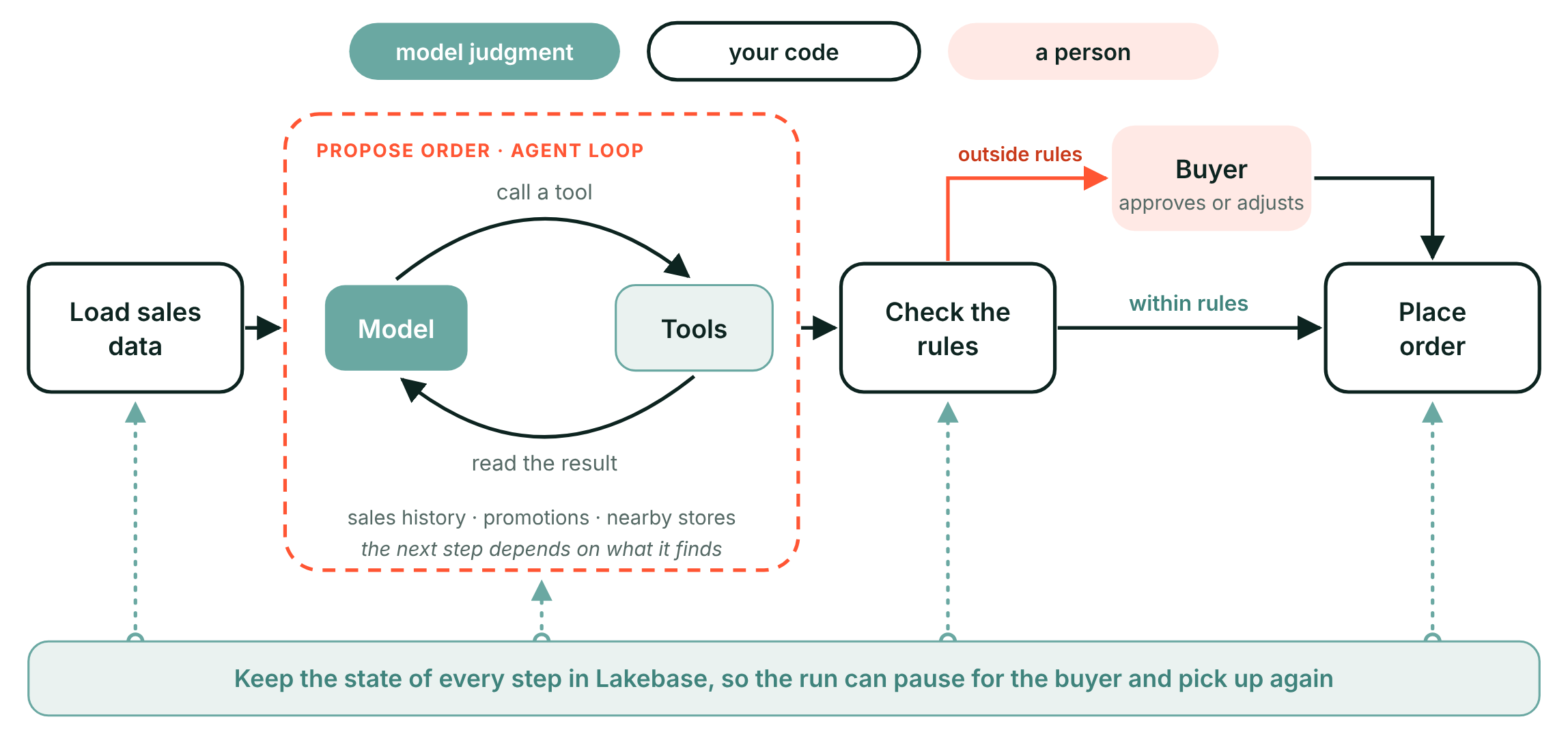
Not only fixed flows. A framework doesn't force you to draw every step in advance. The "propose order" step from the example is really an open agent loop: the model checks sales history, looks at the promotion calendar, compares nearby stores, and decides what to look at next based on what it finds. Around that loop the path stays yours: loading the data before; the rule check, the buyer and the order after. You can keep the state of every step in Lakebase, so a run can pause for the buyer and pick up where it left off.
That leaves one question for every agent you build: which parts you want to define yourself, and which you're happy to get ready-made.
Layers, not rivals
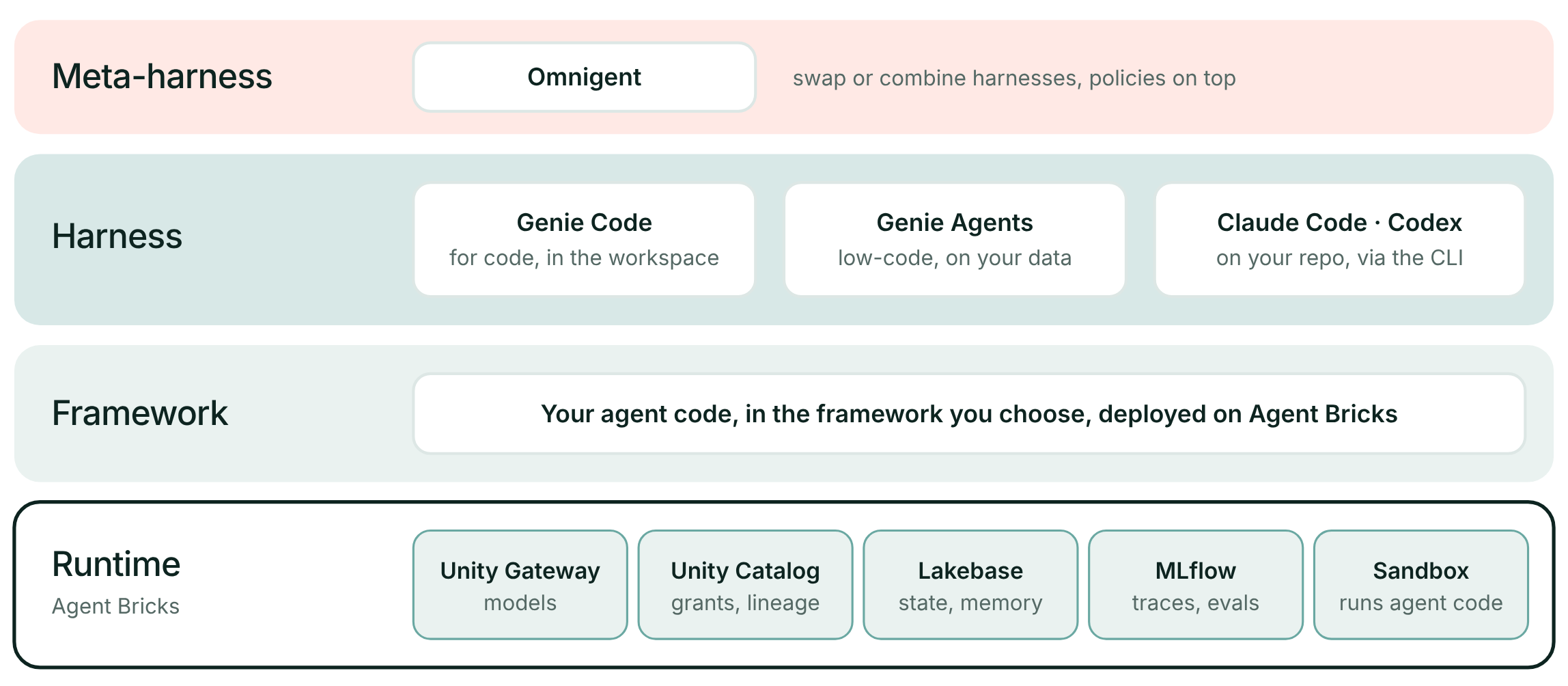
Framework and harness are not competing products. They are layers of one stack: you choose per job, and the choices stack. On Databricks each layer has a concrete tenant.
- Runtime: Agent Bricks, with Unity Gateway for models, Unity Catalog for grants and lineage, Lakebase for state and MLflow for traces and evaluation.
- Framework: your own agent code, in the framework you choose, deployed on Agent Bricks.
- Harness: Genie Code and Genie Agents in the workspace, or Claude Code and Codex on your repo, working through the Databricks CLI and managed MCP servers.
- Meta-harness: Omnigent, Databricks' open-source layer that sits above several harnesses, lets you swap or combine them and enforces policies outside the model.
What sits inside a coding harness
Open up a coding harness and you find six components around the loop. They all exist for one reason: to keep the context window filled with what the model needs, and nothing else.
- Repo context. Loads your instructions and the shape of the repo before your first word.
- Prompt caching. Keeps a stable prefix, so repeated turns stay cheap.
- Tool use. Runs commands and calls tools, within the permission rules you set.
- Context reduction. Clips tool output before it floods the window.
- Structured session memory. Writes notes that survive the session.
- Subagents. Hands bounded side-tasks to a fresh context.
Coding harnesses are the harness route most teams already use, and they work on agents built the framework way, like this one.
The rest of this piece follows one change to the replenishment agent, made with a harness: who decides when it is done, where its state lives, and how you test it.
A finished loop is not a finished job
This is where repo context and tool use come in. For a coding task, a harness changes where you start. You don't build the parts that read files, edit them and run commands. You configure a harness that already has them: an instructions file in your repo, the tools it may use, and the boundaries of what it may touch.
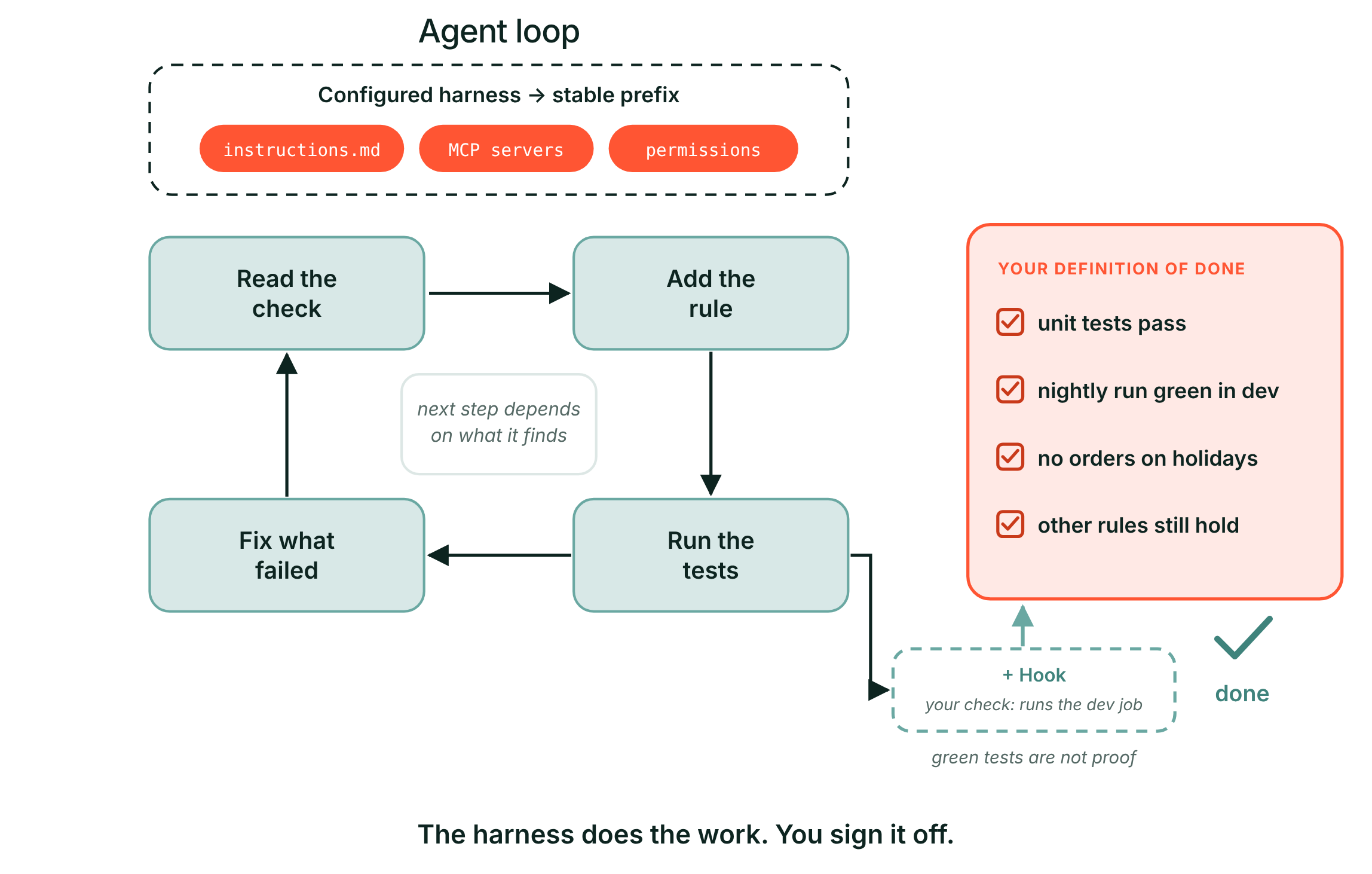
The model then works the way an engineer would. It reads the code, makes a change, runs the tests, and picks its next step based on what it finds.
What it can't decide for you is when the work is done. A loop that ends in green tests only proves the loop ran.
Take the agent framework we discussed above. The buyers want a new rule: no orders on public holidays. You ask Genie Code, or Claude Code on the agent's repo, to add it to the check step. The harness reads the check, adds the rule, writes tests and loops until they pass. Then it reports that it is done. But for this change, done means four things: the unit tests pass, a nightly run in dev completes, no orders land on a holiday, and the other rules still hold. Write that list into the instructions file, or better, into a hook the harness cannot skip.
Long tasks: keep the state outside the conversation
Here context reduction works against you, and session memory has to make up for it. Say the change takes two days. On day one the harness adds the rule, deploys to dev and starts a nightly run. The run fails on one store. Then the context window fills up, and the harness compacts it into a summary: "added the holiday rule, tests pass".
The goal survives. What day two needs is gone: that the dev run failed, on which store, and that the dev orders table now holds a test batch. So day two starts confident, and redeploys blind.
The fix is to keep the state of the work where the next session can read it, outside the model. Each place answers a different question, and Databricks keeps two of them for you: run history and table history.
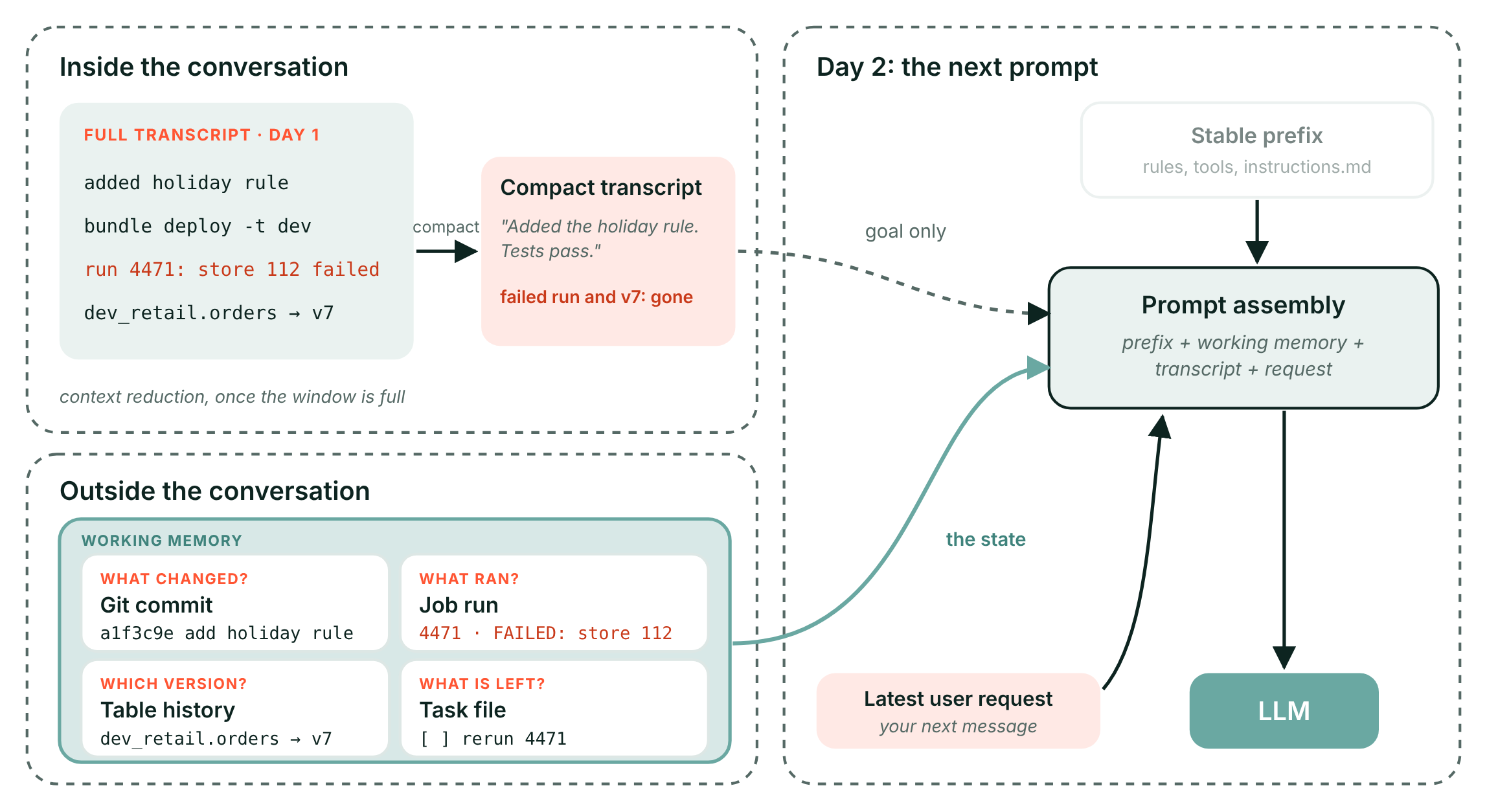
So before a session ends, have the harness commit its work, note the run ID and update the task file. Day two then starts from facts, not from a summary.
Test what happens after a failure
This tests session memory, and how far your tool rules reach into subagents. A clean demo tells you little. An interrupted run tells you how the system around the model behaves.
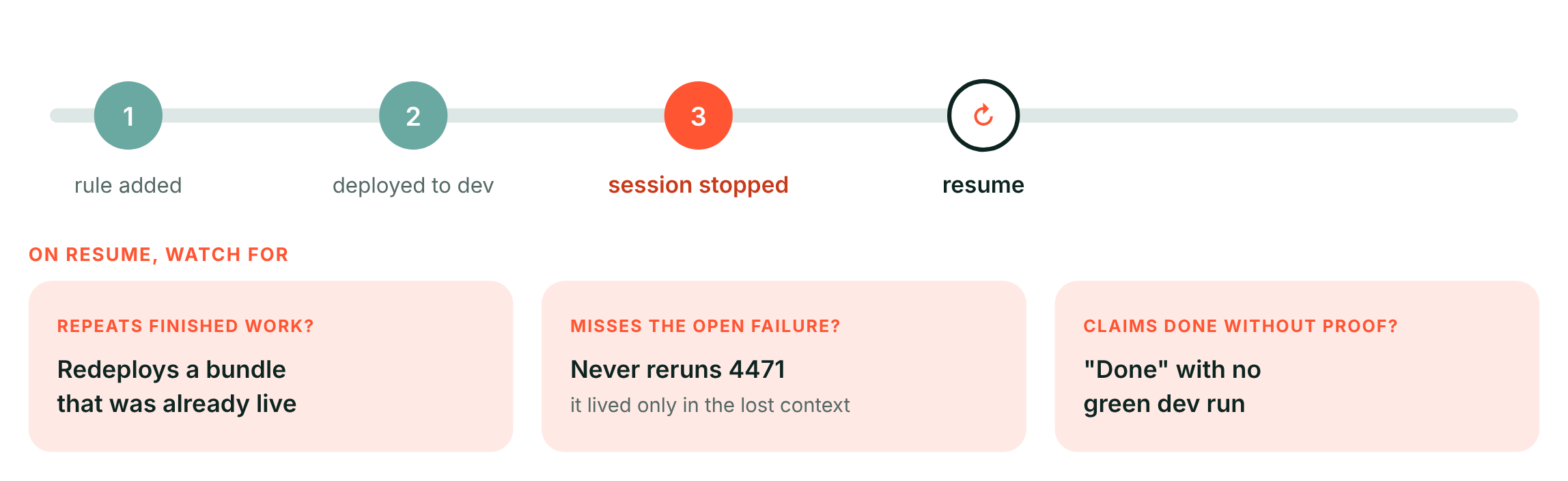
Give the harness the holiday-rule change. Let it add the rule and deploy to dev, then stop the session before it checks anything. Resume it and watch for three failures:
- It repeats finished work. It redeploys a bundle that was already live in dev.
- It misses the open failure. The failed dev run lived only in the lost context, so it never reruns it.
- It claims done without proof. It reports success with no green dev run behind it.
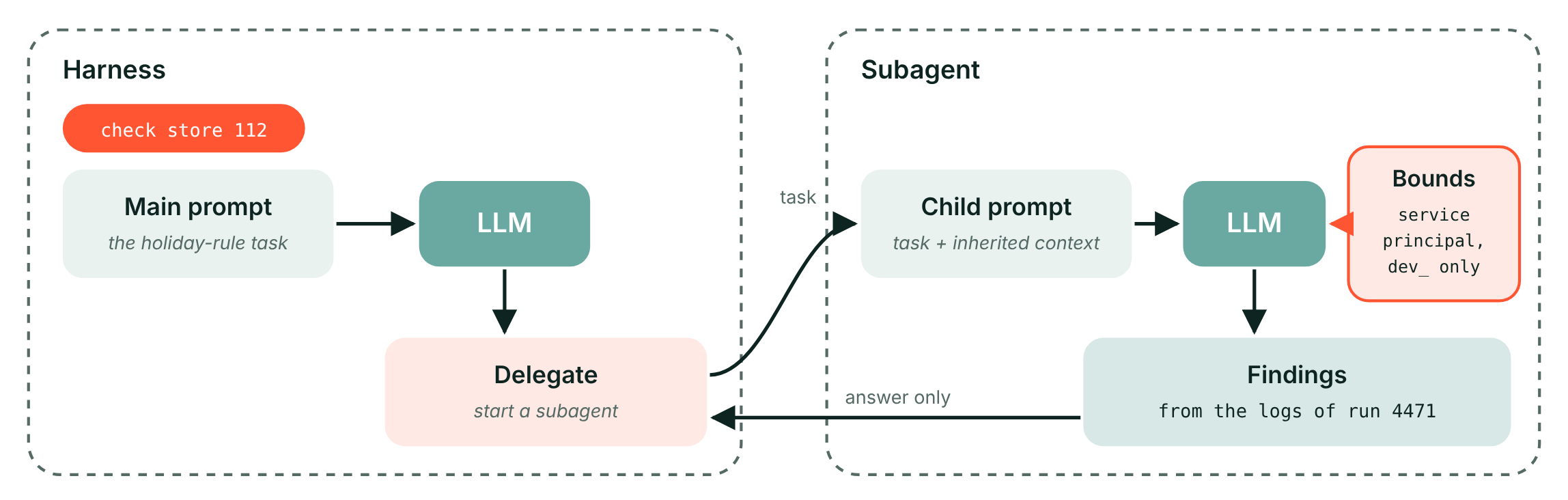
Then check delegation. Say the resumed harness hands "check store 112" to a subagent. Does that subagent play by the same rules? On Databricks the answer lives in Unity Catalog: run the harness as a service principal with grants on dev_ catalogs only, and every subagent inherits that limit, whatever its prompt says. It reads the logs and sends back only its answer.
In short
This piece looked at two ways to get an agent on Databricks, and at what makes a harness hold up.
- Framework or harness. A framework gives you the parts and you draw the path. A harness gives you a working loop that you configure.
- With a framework, you decide where the model stops. The model proposes, your code decides, and an open agent loop can still sit inside a path you control, as in the replenishment agent on Agent Bricks.
- Layers, not rivals. Frameworks and harnesses work on the same Databricks stack, from Unity Gateway and Unity Catalog to Lakebase and MLflow, and you choose per job. Inside a coding harness, six components keep the context window filled with only what the model needs.
- A harness holds up through what you build around it. Your own definition of done, state kept outside the conversation, and an interrupted-run test with subagents inside your bounds.
Building agents on Databricks and wondering which route fits? Get in touch with Frits on LinkedIn.